How to optimize content for AI search
Learn how to optimize content for AI search with clearer answers, better structure, original evidence and content gap analysis.
Published September 29, 2026 · 8 min readOptimizing content for AI search starts with the same thing good content has always started with: answering the reader's question well.
The difference is that your answer may now be read twice. First by a retrieval system deciding whether a section of your page is useful. Then, hopefully, by the person who clicks through.
That changes how content should be written and structured. A useful page still needs depth, expertise and a reason to exist. But the important parts also need to be easy to find, understand and reuse without the reader, or an AI system, having to piece the answer together from five different paragraphs.
Here is how we approach it.
1. Start with the questions people actually need answered
Keyword research is still useful. It tells you how people search and helps quantify demand.
But a page usually needs to answer more than its primary keyword.
Someone researching AI visibility software might ask:
- What does an AI visibility tool measure?
- Which AI engines can it track?
- How is AI visibility calculated?
- Can it track competitors?
- Does it monitor citations?
- How frequently is the data updated?
- How is this different from rank tracking?
Those questions are the substance of the page.
This becomes more important in AI search because one user prompt can lead an engine to investigate several related questions before generating its answer. A page that only repeats one target keyword may rank for that keyword while still failing to provide the information needed for the wider answer.
Build pages around the subject and the questions a real buyer would ask about it.
2. Put the answer close to the question
If a heading says:
What is AI visibility?
Don't spend two paragraphs explaining why search is changing before answering it.
Start with the definition.
AI visibility measures how prominently a brand appears in AI-generated answers across prompts relevant to its market.
Then explain the nuance.
This works for people because they can scan the page quickly. It also gives retrieval systems a self-contained passage that directly connects a question with an answer.
The same rule applies to product pages, guides, documentation and research.
If a section promises an answer, give the answer first.
3. Make sections understandable on their own
Open a long article and copy one section into a blank document.
Does it still make sense?
A section that begins with "As mentioned above" or depends on terminology introduced 1,500 words earlier is harder to understand out of context.
Instead, write sections around a clear subject.
Rather than:
This is why it matters when comparing them.
Write:
Comparing AI engines separately matters because ChatGPT, Gemini, Perplexity and Google can return different brands and sources for the same prompt.
There is some repetition in writing this way. That's fine. Clarity is more useful than forcing every sentence to depend on the paragraph before it.
…this is why it matters when comparing them.
Why compare AI engines separately?
Comparing AI engines separately matters because ChatGPT, Gemini, Perplexity and Google can return different brands and sources for the same prompt.
4. Use headings to map the information
Headings shouldn't exist because an SEO tool told you that your article needs another H2.
They should tell the reader what is underneath them.
For practical content, question-based headings often work well:
- How does AI visibility tracking work?
- Which AI engines should you monitor?
- How often should you track prompts?
- How do you measure citations?
- What is the difference between mentions and citations?
Not every heading needs to be a question. "AI visibility metrics" may be perfectly clear.
The test is simpler: could someone scanning only the headings understand what the page covers?
Google's current guidance for generative AI search is refreshingly unexciting on this point. It recommends organizing content in ways that help readers and explicitly says there is no requirement to create tiny "AI-friendly" content chunks or rewrite pages into a special machine-oriented format.
Write for people. Give the page enough structure that machines don't have to guess.
5. Use bullets and tables when the information calls for them
A wall of prose is a poor way to explain five independent features.
A paragraph is also a poor format for comparing four products across six attributes.
Use the structure that matches the information.
Bullets work well for:
- features
- requirements
- examples
- independent recommendations
- pros and cons
Numbered lists work well when order matters:
- Find relevant questions.
- Check whether the page answers them.
- Add or improve missing answers.
- Publish the update.
- Monitor whether visibility changes.
Tables work well for comparisons or structured facts.
| Format | Best used for |
|---|---|
| Paragraph | Explanation and argument |
| Bullets | Independent points or options |
| Numbered list | Processes and sequences |
| Table | Comparing several items across the same attributes |
| FAQ | Distinct questions that haven't already been answered clearly |
The point isn't to add formatting for AI.
It is to stop hiding structured information inside unstructured prose.
6. Add a TL;DR when the page genuinely needs one
A short summary can work well on a long article, research piece or detailed guide.
It shouldn't repeat the introduction.
A useful TL;DR contains the handful of conclusions someone should understand even if they read nothing else.
For example:
TL;DR: Write for the reader first. Answer important questions directly, organize related information under clear headings, use lists and tables where they improve comprehension, support claims with evidence and check whether important buyer questions are missing from the page.
On a 600-word article, that may be unnecessary.
On a 3,000-word research report, it can save the reader several minutes.
7. Give AI something better than a summary of everyone else
Structure won't rescue generic content.
If ten existing articles already explain a topic well and your article rewrites the same ten points, there is little reason for a reader, Google or an AI system to prefer yours.
Useful additions include:
- original data
- first-hand experience
- screenshots
- tests
- proprietary research
- real examples
- a useful framework
- expert commentary
- a clearer comparison than exists elsewhere
This is particularly important for AI search.
AI systems can synthesize generic information themselves. Your content is more valuable when it contributes information that isn't already available in twenty near-identical articles.
A clean H2 structure makes information easier to find. The information still has to be worth finding.
8. Back factual claims with evidence
"Structured content performs better in AI search" is easy to write.
Explaining what was measured, by whom and under what conditions is much more useful.
When you use statistics:
- Find the original source where possible.
- Check what was actually measured.
- Include enough context to avoid turning correlation into causation.
- Link the claim to the evidence.
This also means resisting attractive statistics when you can't validate where they came from.
A page filled with precise-looking numbers isn't automatically evidence-based.
Original research is even better when you have it. If your company has thousands of relevant customer interactions, search queries, product events or AI responses, there may be information sitting inside the business that nobody else can publish.
9. Find the questions your existing page doesn't answer
Creating more content isn't always the answer.
Often the better opportunity is hidden inside a page you already have.
Suppose you have a strong page explaining project management software. It answers:
- what project management software is
- common features
- major use cases
- how much it costs
But users are also asking:
- Which tools are best for agencies?
- Which support external clients?
- Can they handle time tracking?
- Which integrate with accounting software?
Those aren't necessarily four new articles.
They may be gaps in the existing page.
Finding content gaps in Vercite
This is what we're starting to surface with Content gaps in Vercite.
Instead of looking only at whether a URL was cited, Vercite analyzes the content of the page and the questions surrounding the topic.
For each page, you can see questions the page already answers and questions it doesn't answer.
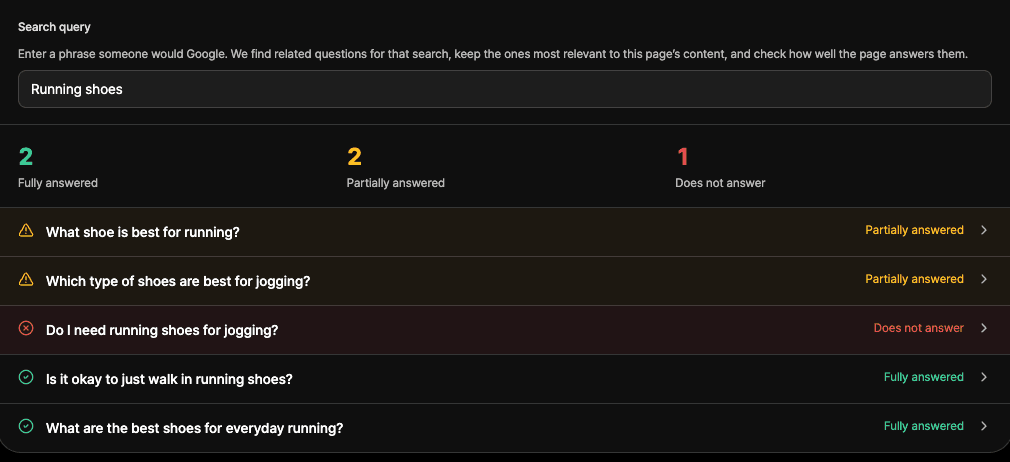
That creates a much more useful optimization workflow:
- Find a page relevant to prompts you care about.
- See which questions it already covers.
- Identify unanswered or weakly covered questions.
- Decide which questions belong on that page.
- Improve the page where there is a genuine information gap.
- Keep tracking the related prompts to see what changes.
The important step is number four.
A content gap isn't an instruction to add another H2. Some questions shouldn't be answered on that page at all.
The goal is better coverage, not bigger pages.
10. Don't optimize a good article into a bad one
AI optimization can go too far.
A page made entirely from 50-word answers, tables, bullet lists and FAQs may be easy to parse and painful to read.
People still want explanation. They want examples. Sometimes they want an argument to develop across several paragraphs.
Google's own guidance on generative search makes a similar point: it recommends useful, original, people-first content and says publishers don't need to rewrite content in a special way purely for generative AI systems.
So keep the article human.
Use short answers where a short answer works. Use a long explanation where the subject deserves one.
A good rule is to ask whether each structural decision makes the page clearer for the reader.
If the answer is yes, it will usually make the page easier for machines to understand too.
A practical AI content optimization checklist
Before publishing or updating a page, check:
- Does the page satisfy one clear search intent?
- Does it answer the main question early?
- Have you covered the important follow-up questions?
- Can each major section be understood independently?
- Do the headings accurately describe what follows?
- Are important answers buried under unnecessary introductions?
- Would any prose work better as bullets, steps or a table?
- Are factual claims supported by credible evidence?
- Does the page contribute anything original?
- Are there unanswered questions that genuinely belong on this page?
- Is important content available as readable HTML?
- Would you still publish the page this way if AI search didn't exist?
That last question matters.
The goal of AI content optimization shouldn't be to produce strange content for bots.
It should be to make useful information easier to discover, understand and reuse.
AI systems benefit from that.
So do people.

Builds Vercite and writes most of its research and case studies.
LinkedInThe Types of Citations in AI Answers: What AI Search Actually Cites
AI answers can cite brand websites, media, Reddit, reviews, official sources and more. Learn the main types of AI citations and how to analyze them.
BlogAI Brand Mentions: What They Are and How They Differ From Citations
Learn what AI brand mentions are, how they differ from citations, what mention position means, and how to track brand mentions across AI search engines.
ResearchHow ChatGPT runs query fan-outs
When ChatGPT answers, it quietly rewrites your question – often into English – and searches for that instead. We captured 17,806 of those background queries.
See how AI engines describe your brand
Vercite tracks your mentions, citations and sentiment across ChatGPT, Gemini, Perplexity and Google AI – on a schedule, not a spot check.